- Introduction: Why Hiring Takes 30 Days When It Should Take 6
- The Real Bottleneck: Drowning in Resumes and Calendar Email Chains
- What Recruitment Automation Actually Means Today
- The 4 Core Pieces of an Automated Hiring Stack
- A Realistic 30-Day Rollout Plan for Your Team
- Real Numbers: Two American Companies That Fixed Their Hiring Loop
- Manual HR vs. Automated Pipelines (Side-by-Side)
- 4 Pitfalls That Will Get You Sued or Scared Off Candidates
- Field-Tested Rules for Keeping It Human
- Frequently Asked Questions (FAQ)
1. Introduction: Why Hiring Takes 30 Days When It Should Take 6
Let's be honest about what happens when an American company opens a job posting today. Within 48 hours, your ATS gets hit with 600 applications. Sounds great, right? Except at least four hundred of those resumes came from automated mass-apply tools, fifty are completely wrong for the role, and the remaining qualified candidates are buried somewhere in a giant digital stack.
So what does your hiring manager do? They wait until Friday afternoon to open up Greenhouse or Lever. They spend three hours skimming PDFs until their eyes glaze over. Then starts the dreaded calendar dance—sending emails back and forth trying to find a 30-minute window where three different team leaders are free.
Here is the uncomfortable reality: **A-player candidates don't wait around for three weeks.** By the time most companies finally reach out to schedule an intro call on day 14, the best engineer or sales rep already has two competing job offers on their kitchen table. That slow manual loop is why so many companies feel like hiring is broken.

Figure 1: Autonomous recruitment architecture orchestrating semantic resume parsers, conversational SMS bots, and dynamic panel scheduling.
2. The Real Bottleneck: Drowning in Resumes and Calendar Email Chains
Most executives blame the talent market when positions sit open for two months. But if you look closely at the workflow data, the problem isn't the market—it's administrative friction.
In competitive US markets like software, medical sales, or logistics management, top applicants are usually off the market within 10 business days. If your screening process takes a week just to make first contact, you are essentially interviewing leftover talent.
When you unpack a traditional hiring process, three massive time-sinks immediately jump out:
- Six-Second Resume Skimming: When a recruiter has 400 PDFs to read, they don't read them deeply. They scan for famous college names or recognizable brand logos. That means incredibly talented candidates with non-traditional backgrounds get tossed out almost instantly.
- The Email Scheduling Swamp: Trying to align a candidate with three internal interviewers across Eastern and Pacific time zones can easily eat up twenty emails and five wasted days.
- Expensive Agency Band-Aids: Because internal teams get buried under admin work, companies end up paying third-party headhunters a 20% commission fee ($25,000+ per hire) just to do basic top-of-funnel screening.
3. What Recruitment Automation Actually Means Today
When people hear "recruitment automation," some immediately think of old 2012-era keyword scanners that threw out resumes if they didn't have the exact buzzword. That old approach was terrible for everyone.
Modern **recruitment automation** works completely differently. Today's tools use vector-based parsing and language models to read a resume the way a thoughtful engineering manager would. The software understands context—it knows that managing a $10M budget in NetSuite means the person understands enterprise financial operations, even if the resume doesn't use the exact phrase listed in the job description.
"Good automation doesn't replace human empathy during an interview. It simply clears out the 35 hours of manual spreadsheet updates and calendar ping-pong so your team actually has energy to talk to people."
— Virexra Operations & HR Architecture Team
4. The 4 Core Pieces of an Automated Hiring Stack
You don't need fifty different software subscriptions to fix your talent pipeline. High-performing operations teams usually build their recruitment engine around four connected layers:
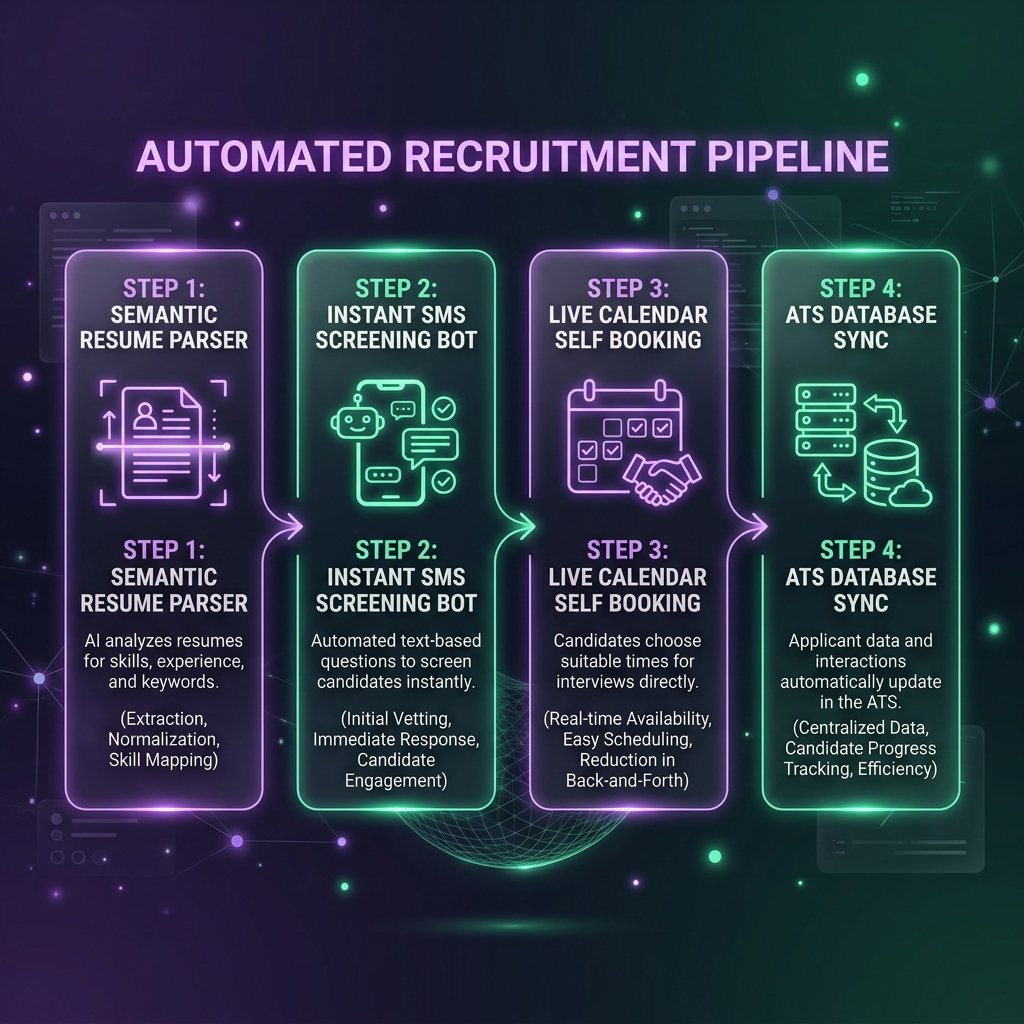
Figure 2: The 4-step recruitment pipeline connecting candidate application intake to live calendar booking and ATS synchronization.
Every SMS answer, scorecard rating, and calendar confirmation is automatically pushed straight into your ATS (Greenhouse, Lever, Workday) and HRIS. Nobody has to copy-paste notes from Slack into a database ever again.
5. A Realistic 30-Day Rollout Plan for Your Team
If you try to automate everything overnight, your hiring managers will push back. Here is the practical, phased approach that works across mid-sized American companies:
Week 1: Clean Up Your Scorecards and Webhooks
Before you automate a single step, sit down with your hiring leads and write down an objective scorecard for the role. What actually makes a candidate qualified? Once that is clear, turn on webhooks in your ATS so new applications trigger an instant alert to your screening pipeline.
Week 2: Turn On Instant Pre-Qualification Texts
Set up an automated SMS or email trigger for applicants who hit your baseline score. Keep it conversational and brief—ask two or three simple questions to verify dealbreakers. For example: *"Hi Alex, thanks for applying for our Austin sales role! Quick question: are you comfortable working on-site three days a week?"*
Week 3: Plug In Automated Panel Briefings
Connect your scheduling links directly to the team's calendars. Then add one simple internal trigger: 24 hours before an interview, have your system Slack the hiring manager a bulleted 1-page summary of the candidate so they walk into the call fully prepared.
Week 4: Shadow Testing and Full Launch
Run the automated pipeline alongside your normal manual review for two weeks. Let recruiters spot-check the decisions. Once the team trusts that the system isn't filtering out good people, flip the switch on 100% of incoming applications.
6. Real Numbers: Two American Companies That Fixed Their Hiring Loop
Let's look at what happens to actual business metrics when you replace manual resume triage with a clean automated pipeline.
A regional trucking carrier in Georgia was constantly battling driver shortages. Their recruiting desk took almost a full week just to call back CDL driver applicants. By the time they reached out, most drivers had already accepted a job with another fleet down the road.
They hooked up an instant WhatsApp screening assistant connected to their ATS and driving record checks. Now, when a driver applies on their phone, they get pre-qualified and scheduled for a drug screening within eight minutes.
22 days → 3 days
Total Time to Hire
$1,850 → $660
Cost Per Qualified Hire
91%
Candidate SMS Completion Rate
A Series B financial software company in California was drowning in over a thousand software engineering resumes every month. Their recruiters were so burned out that hiring leads were wasting hours interviewing candidates who didn't even meet basic technical requirements.
They deployed semantic resume scoring combined with automated GitHub verification. The system screened out spam applications immediately while hiding candidate names during initial review to prevent bias.
38 hrs/wk
Recruiter Admin Hours Saved
4.2x
Higher Offer Acceptance Rate
$140,000
Headhunter Fees Eliminated
7. Manual HR vs. Automated Pipelines (Side-by-Side)
Here is how day-to-day recruiting metrics shift when you remove administrative bottlenecks:
| Recruiting Metric | ❌ Old Manual Process | ✅ Automated Talent Pipeline |
|---|---|---|
| First Response Speed | 5 to 10 business days. High chance of losing top candidates to faster competitors. | Under 2 minutes. Engages applicants while their interest in your company is fresh. |
| Recruiter Daily Focus | 65% of the day spent reading PDFs, updating spreadsheets, and sending calendar emails. | 90% of the day spent having real human conversations and closing strong job offers. |
| Screening Consistency | Varies wildly depending on how tired the recruiter is on Friday afternoon. | 100% consistent scoring against clearly agreed-upon rubric scorecards. |
| Candidate Experience | Long silent waiting periods where candidates wonder if their resume went into a black hole. | Immediate transparent updates and instant self-scheduling interview links. |
8. 4 Pitfalls That Will Get You Sued or Scared Off Candidates
Automating your recruiting workflow is powerful, but doing it sloppily can backfire fast. Watch out for these common operational traps:
- Ignoring State AI Hiring Laws: Places like New York City (Local Law 144) and Illinois have strict laws about using automated tools to screen job applicants. You must clearly disclose that automated qualification tools are being used, offer an alternative human review path, and make sure your tools undergo regular bias audits.
- Sounding Like a Cold Bureaucrat: If your automated SMS says *"APPLICANT #841: REPLY YES OR NO TO VERIFY DEGREE,"* people will drop out immediately. Write your messages so they sound like a friendly human operations coordinator.
- Automating C-Suite or Niche Executive Roles: Automation works wonders for high-volume hiring (sales, customer support, engineering, drivers). But if you are recruiting a Chief Financial Officer, keep the outreach personal from day one.
- Broken Free/Busy Calendar Polling: Never let automated scheduling tools book over a hiring manager's existing team meetings. Always double-check your API permissions so interview slots only open up when every panel member is genuinely free.
9. Field-Tested Rules for Keeping It Human
To get maximum speed without losing the personal touch, follow these three simple habits:
Turn on demographic masking so your screening pipeline strips out names, graduation dates, and physical addresses before scoring. Evaluating candidates purely on accomplishments builds a stronger, fairer team.
When someone comes in second place for a job, tag them as a Silver Medalist in your ATS. Set up an automated prompt that reaches back out to them the moment another similar position opens up six months later.
Busy engineering and sales leaders hate logging into ATS web portals. Send candidate bullet points and one-click feedback scorecards directly into private Slack hiring channels so managers can review them in thirty seconds.
10. Frequently Asked Questions (FAQ)
Recruitment automation means using smart software pipelines, semantic resume parsing, and instant calendar triggers to handle repetitive hiring busywork—like sorting through 600 resumes, texting qualified candidates to confirm basic requirements, and finding open interview times on four different calendars.
Not if you set it up correctly. Good automation actually improves candidate experience because people get a friendly, helpful update within minutes instead of waiting three weeks in an ATS black hole. Plus, you should always give candidates a direct way to request a human review.
If you use automated tools to rank or screen job candidates in places like New York City or Illinois, the law requires three simple things: clearly tell applicants upfront that automated qualification is being used, publish an annual third-party bias audit, and offer an accessible human alternative for anyone who asks.
Most teams notice the bottleneck lift within two weeks. Instead of spending 30 hours a week reading resumes and sending scheduling emails, recruiters spend almost their entire day talking to qualified people and closing job offers.
11. Conclusion: Stop Letting Manual Toil Slow Your Company Down
When your business needs to hire great people, speed is everything. Moving from a sluggish 30-day manual process to a clean 6-day automated loop doesn't just save recruiter time—it directly improves the quality of talent joining your company.
By automating top-of-funnel resume screening, text pre-qualification, and calendar scheduling, you clear away the administrative clutter so your team can focus on what actually matters: having real human conversations with exceptional candidates.
Want to Fix Your Company's Hiring Bottleneck?
Stop losing great candidates to slow 30-day interview loops. Book a free 30-minute workflow consultation with Virexra’s systems team. We will review your current ATS setup and show you how to automate screening and scheduling in 30 days.
Book Free Operations AuditTags: Recruitment Automation, Automated Hiring, ATS Workflow Automation, AI Recruiting, HR Automation 2026, Candidate Screening, Virexra Guide